
Monday, 15 November 2010
Jam Factory Updates....
Now that I've researched the building layout a little more, I've been able to press on with the shop exterior. The tiles proved awkward to assign to the material, but Photoshopping an image of similar tiles from the internet gave a decent representation :o)


Sunday, 14 November 2010
Jam Factory Research....
From internet image searches it became clear that I needed more details of the factory/shop layout at Wilkin and Sons in Tiptree so I've been today to get some photo's. Here's just a few of them :o) .....


Wednesday, 10 November 2010
Mosaic....
It's unclear what exhibits will be on display in the VAF at the moment but a Roman mosaic from the castle will housed within the gallery. It was originally discovered on the site of the VAF so it seems an appropriate new home.


Modelling the Jam Factory.....
I'm aiming to concentrate the animation on the reflection of the factory in the Jam Jar but need to model a basic factory building arrangement so that the camera can pan round and see where the jam is produced.

Update:
Done a little more to the building now. I've added the wall and railings around the outside seating area and constructed a better door.
The door is constructed from basic polygons and I've added another thin box behind it to act as the glass plane. 


The factory models only need to be basic with not too much detail but at least give a nod to the actual buildings.
I've started with the main entrance buildings, using low poly models and applying basic brick and woodwork materials.
The doors and sign are simple images grabbed from Google and modified in Photoshop.

Update:
Done a little more to the building now. I've added the wall and railings around the outside seating area and constructed a better door.
The door is constructed from basic polygons and I've added another thin box behind it to act as the glass plane.

Material is from the Raytrace/Arch and Design set as follows....
I've altered the settings to achieve good reflection properties but very little transparency as the interior of the building is not detailed.


Monday, 8 November 2010
Jammy goodness........ :o)
For the Tiptree Jam Factory (Wilkins and Sons) I'm going to try for a strawberry jam jar reflecting the factory. The camera will then pan round to see the buildings (hopefully ;o)
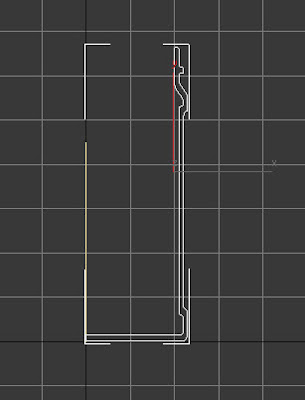
For the jam jar, I sketched a Spline Curve.....
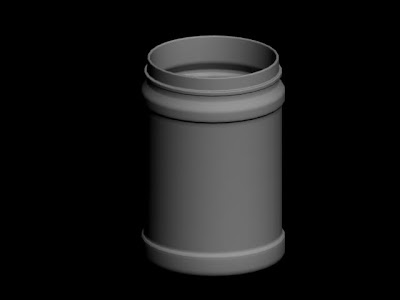
Then revolved it round using the Lathe Tool...
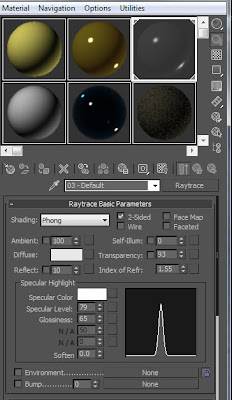
For the glass effect, I set the material type to Raytrace and the settings as follows.....
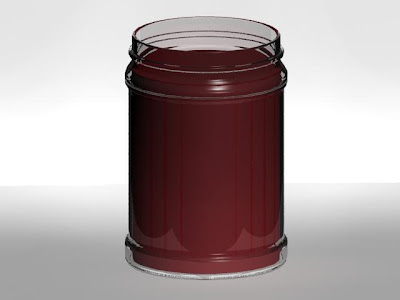
This gave me a nice see through glass effect.... (At the moment, the 'jam' is just a red cylinder)
For the lid I used a shaped Cylinder with polygons pushed in and out then Turbosmoothed...
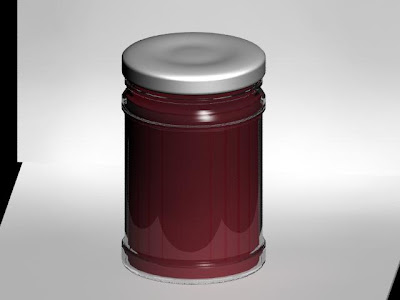
Just need to figure out how to get the label on the jar now ;oD
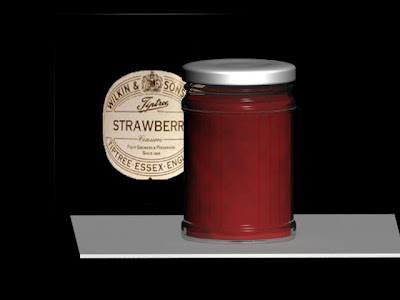

Update..... Got the labels on now :o)
For the jam jar, I sketched a Spline Curve.....

Then revolved it round using the Lathe Tool...

For the glass effect, I set the material type to Raytrace and the settings as follows.....

This gave me a nice see through glass effect.... (At the moment, the 'jam' is just a red cylinder)

For the lid I used a shaped Cylinder with polygons pushed in and out then Turbosmoothed...
Just need to figure out how to get the label on the jar now ;oD

For the 'strawberry jam' I experimented with several different types of material maps before finaly adding a Speckle Map to the Bump channel then set the colour options to different shades of red. It gives a nice jammy effect :o)

Update..... Got the labels on now :o)
The label images were modified in Photoshop then aplied to the Material of a cylinder which is just proud of the glass surface. For the label on the glass, the image had a black and white Mask which was added to the Opacity Channel which sees black as transparent.


Populating the scene.....
I saved a version of the male model and moved a few polygons to create a female version. These were then added to the scene.
By copying (Move and Shift) the people, then changing the colour of the clothes they look less like clones.


By copying (Move and Shift) the people, then changing the colour of the clothes they look less like clones.

.
I scaled some of the people to create children too.
.

Friday, 5 November 2010
Low poly people.....
The scenes looked a bit sterile without scenery and people so I thought I'd model some low poly people.
I started with a basic Box and Extruded Polygons as and when I needed them.


Then once complete, I added a Turbosmooth.
Finaly, I added some basic colour Materials. So that the same colourscheme wasn't used over and over in crowd scenes, I've used Created Groups for the Polygons eg: Shirt Group. This way, it'll be easy to select the various elements and change the colour.


I started with a basic Box and Extruded Polygons as and when I needed them.


Then once complete, I added a Turbosmooth.
.

Finaly, I added some basic colour Materials. So that the same colourscheme wasn't used over and over in crowd scenes, I've used Created Groups for the Polygons eg: Shirt Group. This way, it'll be easy to select the various elements and change the colour.

Subscribe to:
Posts (Atom)